From Frames to Function
Why we’re designing less in Figma—and more in the browser.
For years, digital design has followed a familiar sequence: design the experience in Figma, get it approved, document it, hand it to development, and then work through the inevitable gap between what was designed and what was built.
We’re changing that process at ANML.
Once we’ve established the strategy and design language, we’re increasingly moving from static design into functional prototypes built in code. Our designers work in the browser, explore motion alongside layout, define interaction with greater precision, and build reusable components as the experience takes shape.
This isn’t about doing less design.
It’s about spending more of our time designing the actual experience—and less time describing how that experience should eventually work.
Key takeaways
Discovery, strategy, and brand direction still come first.
We create a shared project knowledge base that Claude continuously references throughout the process.
Figma remains an important exploration tool, but it’s no longer where every design decision has to be resolved.
Through an MCP, Claude Code can reference our Figma file and design system, helping us bring that work into a functional environment.
Motion, scrolling, easing, responsiveness, and interaction can be designed directly in the browser.
Designers work in GitHub, deploy functional prototypes, and review those experiences directly with clients.
The effort that once went into describing behavior can increasingly go into designing and refining it.
Why are we using less Figma?
Figma is an excellent design tool. We still use it every day.
What’s changing is the expectation that every design decision needs to be resolved there.
Digital experiences don’t exist as static frames. They move. They respond. They change state. They react to scrolling. Elements enter and leave the viewport. Navigation transforms. Layouts adapt.
A traditional design process can represent those ideas through breakpoints, component states, motion studies, prototypes, annotations, and specifications.
But there is still interpretation between the representation and the final experience.
How does something enter the page? When does it begin to move? How quickly does it accelerate? How does it ease into place? How does it react to scrolling? How does that behavior change as the experience changes around it?
We can now answer more of those questions directly in the medium where the experience will ultimately live.
And that reduces something we’ve started thinking of as the translation tax: the time and effort spent turning a representation of an experience back into the experience itself.
What does our process look like now?
We aren’t asking designers to become traditional front-end engineers.
We’re expanding the material they design with.
Our designers use Figma, Claude Code, a shared project knowledge base, GitHub, and deployed browser-based prototypes as parts of a connected creative environment.
And while the activities below have a general progression, the process itself is not linear.
We move between them continuously as the work evolves.
1. Start with discovery and immersion
We begin by understanding the business, audience, opportunity, goals, and constraints.
We define the experience strategy and establish the brand direction that will guide the work.
This creates the foundation for the decisions that follow. Before we start making things faster, we need to know what we’re trying to make—and why.
A shared context that stays with the project
Alongside that work, we create a shared project knowledge base from meeting notes, discovery conversations, strategy documents, requirements, research, and other project materials.
This isn’t a step we complete and leave behind.
It’s a persistent layer of context throughout the engagement.
Claude continuously references this shared knowledge base as we design and iterate.
As the project evolves, that context evolves with it. Goals, decisions, requirements, conversations, and strategic thinking remain accessible as we move between exploration and implementation.
That gives us an important counterbalance to speed.
We can move quickly without every interaction starting from zero.
2. Establish the design language
With the strategy in place, we define the visual and experiential language.
Typography. Color. Hierarchy. Grids. Imagery. Components. Interaction principles.
Figma remains particularly useful here. It gives us a fast, flexible canvas for visual exploration and helps us establish the foundations of the system.
But once that language begins to take shape, we don’t need to resolve every page, breakpoint, state, and behavior as a static representation.
We can start making it functional.
3. Bring the design system into code
Claude Code connects to our Figma file and design system through an MCP.
This creates a bridge between the work we’ve established in Figma and the functional prototype we’re building in code. Claude can reference the components, styles, patterns, and design decisions already defined in the system, giving our designers a starting point grounded in the work we’ve already done.
We can pull that work into Claude Code and begin bringing it to life in a real browser.
That continuity is important.
We aren’t starting over when we move into code, and we aren’t asking another team to reinterpret the design system from a set of static files.
We’re taking the design language we’ve already created and making it functional.
4. Design the behavior
Once the system is functional, we can start designing the parts of an experience that are much harder to fully express in static frames.
And this is about much more than breakpoints.
A digital experience unfolds over time.
Elements enter and leave. Content responds to scrolling. Navigation changes state. Images scale. Components expand and collapse. Transitions accelerate and settle.
There are dozens of small decisions that determine how an experience actually feels.
When does something begin to move?
How quickly does it accelerate?
How does it ease into place?
What triggers it?
How does it react to scrolling?
How do multiple movements sequence together?
What happens when the content or viewport changes?
Working in the browser lets us define these details directly.
We can change an easing curve and immediately feel the difference. Adjust when an element enters. Tune how multiple movements relate to one another. Scroll the experience. Resize it. Change the content. Use it.
This gives designers much greater precision over behavior.
And importantly, it changes where we spend our time.
The work doesn’t disappear. It moves upstream.
Time that once went into documenting how an experience should behave can instead go into designing that behavior—testing states, tuning motion, refining responsiveness, and resolving details before they reach production.
Motion becomes another design material, alongside typography, composition, color, imagery, and space.
5. Build the system as we design
As patterns become established, we catalog components in code.
Those components can be reused across new functional pages, tested with different content, refined, and expanded.
The design system grows alongside the experience instead of being documented only after the work is complete.
As the system gets stronger, we gain leverage. We can spend more of our attention on the parts of the experience that need new thinking rather than repeatedly recreating patterns we’ve already solved.
6. Deploy, experience, and refine
Our designers work in branches connected to the project repository.
As the work evolves, we merge those branches and deploy functional prototypes that our team and the client can access in a real browser.
Clients can navigate the experience, interact with it, resize it, experience the motion, and leave contextual feedback through BugHerd.
Instead of asking:
“Can you imagine how this will work?”
we can ask:
“Does this work?”
What we learn feeds directly back into the design.
That might mean refining the prototype in code. It might reveal a larger visual question that sends us back into Figma. It might change a component or even challenge an assumption we made earlier.
That’s why we don’t think of this as a six-step pipeline.
It’s a connected system with feedback loops.
Iteration hasn’t increased. It has moved earlier.
Creative work has never been linear.
We might establish a direction in Figma, bring it into Claude Code, experience it in the browser, discover something that changes our thinking, and jump back into Figma to explore the idea visually.
Then we move back into code.
Figma → code → experience → feedback → Figma → code.
Sometimes a visual problem is faster to explore on a canvas. Sometimes you need to scroll, click, resize, or feel the motion before you know whether an idea is working.
What’s different is when those discoveries happen.
Issues that might once have surfaced during development or design QA can now be encountered while we’re still actively designing the experience.
We’re not adding more cycles. We’re making each cycle more useful.
The shared project knowledge keeps that nonlinear process anchored. Even as we move backward and forward, the goals, strategy, requirements, and decisions remain part of the context.
Explore. Build. Experience. Refine. Repeat.
What does this have to do with functional branding?
A lot.
We think of a digital brand as more than a visual system.
It’s also a behavioral system.
A brand isn’t experienced as a collection of static moments. It unfolds.
How quickly something responds can feel like the brand.
How an image reveals itself can feel like the brand.
The restraint or energy of an easing curve can feel like the brand.
The way a page reacts as you scroll can feel like the brand.
These aren’t implementation details added after the identity is complete.
They’re design decisions.
Working in code lets us make those decisions while the visual language is still evolving.
A transition can be expressive or restrained. An interaction can feel precise, playful, quiet, or immediate. Motion can reinforce the same qualities as typography, color, imagery, and composition.
That’s what we mean by functional branding: the identity isn’t simply expressed through what an experience looks like.
It’s expressed through what it does and how it behaves.
Does AI make design simpler?
No.
It makes a different design process possible.
Tools like Claude Code make it easier for designers to work directly with functional software. But generating an interface is not the same thing as designing a good experience.
You still need judgment.
You still need to understand the user, the business, and the brand.
You still need to establish hierarchy, composition, rhythm, interaction, and behavior.
You still need to know when motion adds meaning and when it gets in the way.
AI changes what our designers can manipulate directly. It doesn’t replace the experience required to know what should be made.
That distinction matters.
The value isn’t that AI lets us produce the same deliverable with less effort.
It lets us put more of that effort into the experience itself.
What does this look like at enterprise scale?
We recently used this approach as part of our work on the Salesloft rebrand, a large-scale B2B digital experience.
B2B experiences bring their own kind of complexity. You’re often communicating sophisticated products to multiple audiences, across many pages and content types, while still needing the brand to feel distinct and coherent.
At that scale, designing isolated pages isn’t enough.
You need systems.
Components need to be reusable. Content needs to flex. Motion needs to remain consistent. Responsive behavior needs to hold up across many different scenarios.
Working with functional prototypes allowed us to encounter those questions earlier, while we still had the freedom to design around them.
And we can see the difference downstream.
On our last static-design project, 1 in 4 QA tickets existed only to make the build match the Figma comps. On the Salesloft rebrand, where we designed in code and the functional prototype became the spec, that dropped to 1 in 9.
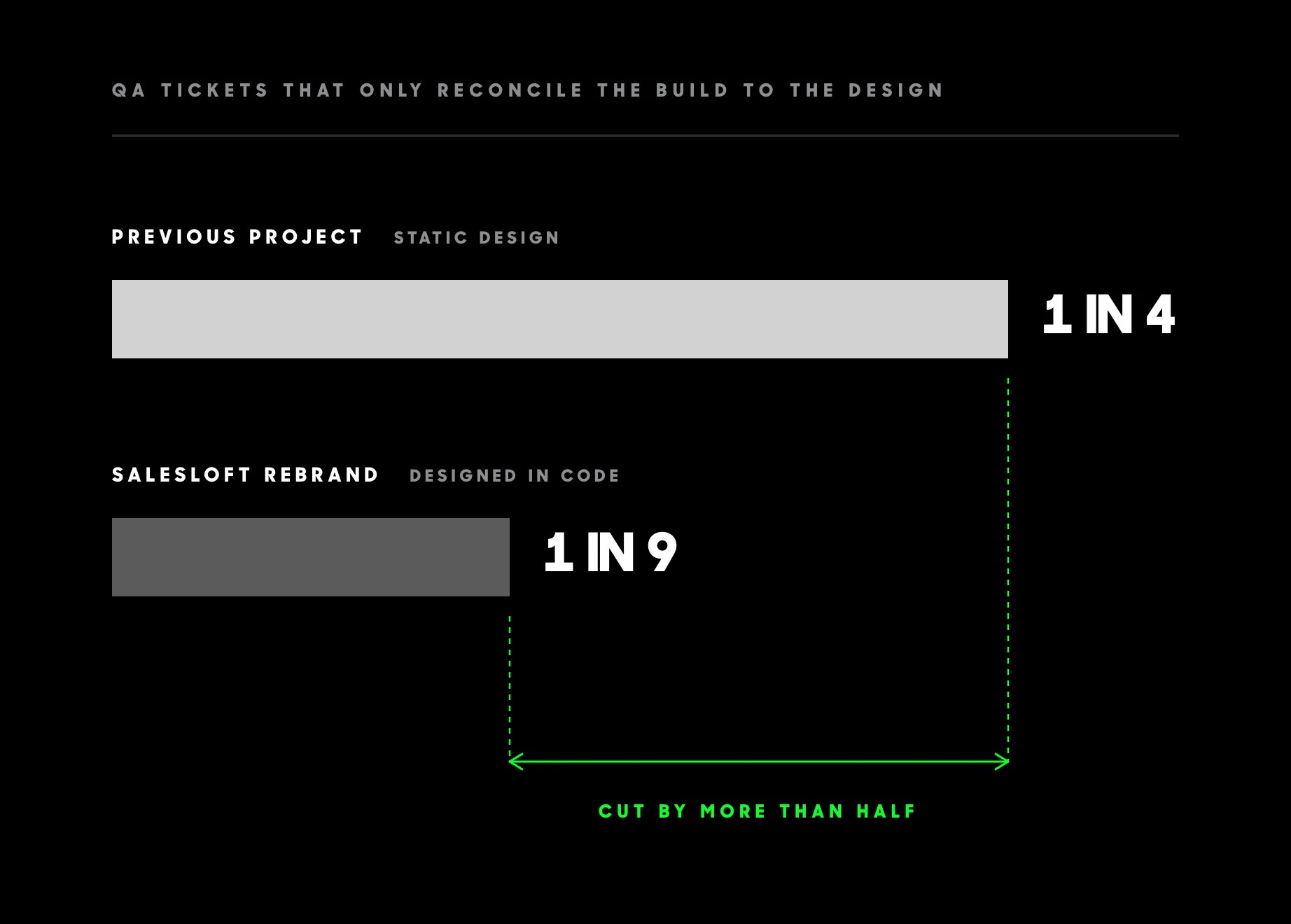
In other words, designing in code cut the translation tax by more than half.
That matters because those tickets don’t represent new ideas or improvements to the experience. They represent time spent getting the implementation back to something that had already been designed.
By resolving more of the experience in the actual medium before production, we can shift more of that effort toward the work itself.
Not more iteration for the sake of iteration.
Not fewer hours spent designing.
More of the engagement spent making decisions that survive into the final experience.
Are we replacing Figma?
No.
We’re changing where different parts of design happen.
Figma remains valuable for exploration, concepts, systems thinking, collaboration, and establishing a design language.
Code gives us another environment for design.
And there isn’t a clean dividing line between the two.
A browser experiment might send us back into Figma. A visual exploration in Figma might lead to another functional prototype. Motion might change composition. Responsive behavior might change the component structure.
The goal isn’t to choose Figma or code.
It’s to use the best medium for the decision we’re making.
What changes when design gets closer to the final medium?
For us, the biggest shift isn’t simply speed.
It’s fidelity.
The thing the client reviews is closer to the thing the developer receives.
The thing the developer receives is closer to the thing that launches.
And the behavior we design is closer to the behavior people ultimately experience.
There are fewer translations along the way.
The hours that might once have gone into describing, annotating, and interpreting an experience can increasingly go into the experience itself.
More states explored.
More behavior resolved.
More motion refined.
More edge cases encountered.
More decisions made while they’re still design decisions—not production corrections.
For years, digital design workflows have been built around increasingly sophisticated ways of describing what software should do.
We can now spend more of that time designing what it actually does.
We’re collapsing the distance between strategy, brand, design, motion, and development.
And we think the work is better for it.
ANML designs and builds digital experiences where brand, product, motion, and technology work as one system. If you’re rethinking a digital platform or building an experience where the details matter, let’s shape what comes next.
FAQ
Is designing in code faster than designing in Figma?
Speed isn’t really the point. The larger opportunity is where the effort goes. Behavior, motion, responsive decisions, and component logic can be explored directly rather than extensively documented for someone else to recreate.
Does AI-assisted design mean the work should cost less?
We don’t see AI as a way to produce the same work with less design.
It changes what designers can spend their time designing.
Effort that previously went into specifications, redlines, motion references, and explaining intended behavior can increasingly go toward refining the experience itself.
The opportunity isn’t simply greater efficiency. It’s greater fidelity.
Do designers need to become developers?
No. Designers still bring design judgment, craft, systems thinking, and an understanding of the user and brand. These tools simply let them work more directly with functional experiences.
Does prototype code go directly into production?
Not necessarily. Production architecture, accessibility, performance, security, testing, and maintainability still matter. The advantage is that development begins with a much clearer expression of the intended experience.
Why not just create interactive prototypes in Figma?
Figma prototypes remain useful. A browser gives us another level of control over real layout behavior, scrolling, easing, timing, responsiveness, and interaction. We use both environments throughout the process.
How does the shared knowledge base fit into the process?
We build a living knowledge base from meetings, strategy, research, requirements, and project decisions. Claude continuously references that context as we work, helping keep exploration aligned with the project’s goals and vision.
How do clients review the work?
Clients review deployed functional prototypes and use BugHerd to leave contextual feedback directly against the experience.
Is this approach appropriate for enterprise and B2B projects?
Yes. We’ve used this workflow on enterprise-scale B2B work, including the Salesloft rebrand. On that project, only 1 in 9 QA tickets were related to translating the approved design into the build, compared with 1 in 4 on our previous static-design project.
What is the biggest benefit?
A greater percentage of the work goes into decisions that survive into the final experience. Designers, clients, and developers are all working much closer to what will eventually launch.
About Anml

Related posts
The “Good Enough” Epidemic
AI tools make it easier than ever to design and ship work. But when “good enough” becomes the default, craft is what separates memorable work from sameness.
Your Brand Isn’t Static—It Lives in the Experience
How the ANML Functional Branding Method Builds Stronger Brands Through Product, Not Just Campaigns
What we learned designing for Apple Vision Pro?
Designing one of the first Apple Vision Pro apps taught us how spatial computing really works, and why its biggest impact is still ahead.